

A sitemap is a file that lists all the important pages of your website, helping search engines discover and index your content efficiently. Think of it as a roadmap that guides Google and other search engines through your site’s structure. There are two main types of sitemaps: XML sitemaps (designed for search engines) and HTML sitemaps (designed for human visitors). Understanding the difference between them and implementing both correctly can significantly improve your site’s visibility and user experience.
What Is a Sitemap?
A website sitemap is essentially a blueprint of your site’s content. It tells search engines which pages exist, how they’re organized, and which ones matter most.
Here’s the simplest way to think about it: Imagine you’re hosting a party in a mansion with dozens of rooms. Without a map, your guests might miss the best rooms entirely. A sitemap ensures search engines don’t miss your valuable content.
Sitemaps serve two distinct audiences:
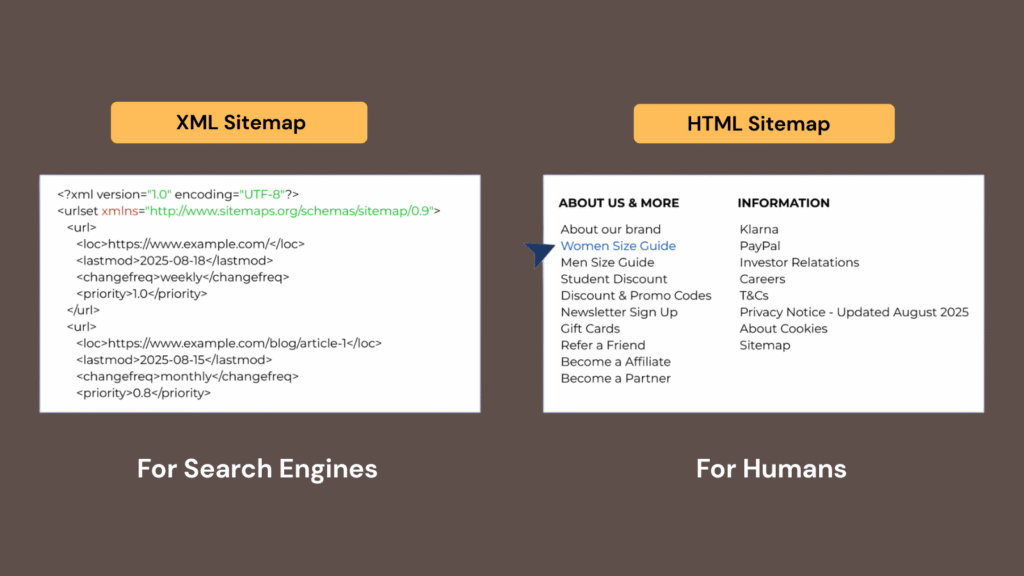
- XML sitemaps communicate with search engine crawlers, providing technical details about your pages, how often they update, and their relative importance.
- HTML sitemaps help real visitors navigate your site, especially when they can’t find what they’re looking for through regular navigation.
Both formats matter, but they solve different problems. One optimizes for machines; the other optimizes for humans.
Why Your Website Needs a Sitemap?
Search engines like Google use automated bots (crawlers) to discover web pages. These crawlers follow links from page to page, gradually mapping out the internet. But here’s the problem: if your pages aren’t well-linked internally, crawlers might never find them.
A sitemap solves this by:
- Ensuring all important pages get discovered and indexed
- Speeding up the indexing process for new or updated content
- Helping search engines understand your site’s structure and hierarchy
- Providing metadata about each page (last modified date, change frequency, priority)
For large websites, e-commerce stores, news sites, or any site with frequently updated content, sitemaps become absolutely essential. Without one, you’re leaving your search visibility to chance.
XML Sitemaps: The Technical Backbone
What Is an XML Sitemap?
An XML sitemap is a structured file written in XML (Extensible Markup Language) that lists URLs along with metadata about each page. It’s specifically designed for search engine consumption, not human readability.
Here’s what a basic XML sitemap looks like:
<?xml version="1.0" encoding="UTF-8"?>
<urlset xmlns="http://www.sitemaps.org/schemas/sitemap/0.9">
  <url>
    <loc>https://example.com/page-1</loc>
    <lastmod>2025-12-15</lastmod>
    <changefreq>weekly</changefreq>
    <priority>0.8</priority>
  </url>
  <url>
    <loc>https://example.com/page-2</loc>
    <lastmod>2025-12-10</lastmod>
    <changefreq>monthly</changefreq>
    <priority>0.5</priority>
  </url>
</urlset>
Each URL entry can include:
- loc: The page’s complete URL
- lastmod: When the page was last modified
- changefreq: How often the page typically changes
- priority: The relative importance of this page (0.0 to 1.0)
When You Need an XML Sitemap
You absolutely need an XML sitemap if your site has:
- Large scale: More than 100 pages become difficult for crawlers to discover completely through internal linking alone.
- Poor internal linking: If pages aren’t well-connected, crawlers might miss orphaned content entirely.
- New content: Fresh sites lack the authority and backlinks that help crawlers discover pages naturally.
- Rich media: Sites heavy on videos, images, or PDFs benefit from specialized sitemap tags that provide additional context.
- Frequent updates: News sites, blogs, and e-commerce stores need to communicate changes quickly to search engines.
XML Sitemap Best Practices
Getting your XML sitemap right requires attention to these critical details:
- Keep it under 50,000 URLs per file. Search engines have limits. If you exceed this, create multiple sitemaps and use a sitemap index file to organize them.
- Only include indexable pages. Don’t waste space listing pages blocked by robots.txt, protected by noindex tags, or redirecting elsewhere. Every URL should be crawlable and valuable.
- Update it automatically. Manual updates lead to outdated sitemaps. Use a sitemap generator plugin or build automation into your publishing workflow.
- Submit it to search engines. Upload your sitemap to Google Search Console and Bing Webmaster Tools. Don’t just create it and hope they find it.
- Reference it in robots.txt. Add a line like Sitemap: https://example.com/sitemap.xml to help crawlers locate it immediately.
- Use separate sitemaps for different content types. Create dedicated sitemaps for posts, pages, products, and media. This organization helps search engines prioritize their crawling.
- Implement lastmod correctly. Only update the last modification date when content actually changes. Search engines learn to ignore sites that falsely signal updates.
- Compress large sitemaps. XML sitemaps can be gzipped to reduce file size and improve load times for search engine crawlers.
- Don’t ignore errors. When search engines report problems with your sitemap, fix them immediately. Persistent errors can reduce crawl efficiency.
HTML Sitemaps: The Human-Friendly Navigator
What Is an HTML Sitemap?
An HTML sitemap is a visible webpage that displays links to all (or most) important pages on your site, organized in a logical hierarchy. Unlike XML sitemaps hidden in code, HTML sitemaps are designed for human visitors.
You’ve probably encountered these: a single page listing every major section of a website with clickable links, often organized by category or content type.
The User Experience Advantage
HTML sitemaps serve visitors who:
- Feel lost navigating a complex site structure
- Want to see everything a site offers at a glance
- Prefer browsing hierarchically rather than searching
- Can’t find what they need through standard navigation
For accessibility, HTML sitemaps are particularly valuable. Screen reader users and those with cognitive disabilities often benefit from having all content listed in one simple, linear format.
HTML Sitemap Best Practices
Creating an effective HTML sitemap requires thoughtful organization:
- Group by category. Don’t just dump 500 links in alphabetical order. Organize by topic, product category, or content type so visitors can scan efficiently.
- Prioritize important pages. List your most valuable content prominently. Not every page needs inclusion; focus on what matters to users.
- Keep it updated. A sitemap pointing to broken links or missing your latest content creates frustration, not clarity.
- Make it accessible. Include a link in your footer or create a dedicated menu item. Visitors shouldn’t need to guess where to find it.
- Use descriptive anchor text. Instead of generic “click here” links, use meaningful descriptions that help visitors understand what they’ll find.
XML vs HTML Sitemaps: The Key Differences
| Feature | XML Sitemap | HTML Sitemap |
| Primary Audience | Search engine crawlers | Human visitors |
| Purpose | Help with indexing and crawling | Improve site navigation and UX |
| Format | Machine-readable XML code | Standard HTML webpage |
| Visibility | Hidden from regular users | Publicly accessible page |
| Content | Technical metadata and URLs | Organized links with descriptions |
| SEO Impact | Direct (helps indexing) | Indirect (through internal linking) |
| Required? | Highly recommended for most sites | Optional but helpful for large sites |
How to Find a Website’s Sitemap
Curious whether a site has a sitemap? Here are the fastest ways to locate one:
- Check the robots.txt file: Navigate to example.com/robots.txt and look for a line starting with “Sitemap:”. Most sites reference their XML sitemap here.
- Try standard locations: Most XML sitemaps live at example.com/sitemap.xml or example.com/sitemap_index.xml. Simply add these paths to any domain.
- Use Google Search Console: If you own the site, Search Console shows all submitted sitemaps under the “Sitemaps” section.
- Look in the footer: HTML sitemaps typically have links in site footers labeled “Sitemap” or “Site Map”.
- View page source: Search the site’s homepage source code for the word “sitemap” to find references or links.
What Is a Sitemap Generator?
A sitemap generator is a tool or plugin that automatically creates and updates your sitemap files without manual coding. For most websites, using a generator is the smartest approach.
Popular sitemap generator options include:
- WordPress plugins: Yoast SEO, Rank Math, and All in One SEO automatically generate and maintain XML sitemaps for WordPress sites.
- Online tools: Websites like XML-Sitemaps.com create sitemaps by crawling your site, ideal for small static websites.
- CMS built-in features: Platforms like Shopify, Wix, and Squarespace generate sitemaps automatically without additional configuration.
- Development frameworks: Tools like Next.js, Gatsby, and other modern frameworks include sitemap generation in their build processes.
The right choice depends on your platform and technical expertise. Most content management systems make sitemap generation effortless.
Common Sitemap Mistakes to Avoid
Even with good intentions, many sites sabotage their sitemaps through these errors:
- Including noindexed pages. If you’ve told search engines not to index a page with a noindex tag, don’t list it in your sitemap. This creates conflicting signals.
- Listing redirected URLs. Sitemaps should only contain final destination URLs, not pages that redirect elsewhere. Crawlers waste resources following redirects.
- Forgetting to update after site changes. When you redesign, migrate, or restructure your site, regenerate your sitemap immediately.
- Blocking the sitemap file. Sounds obvious, but some sites accidentally block their sitemap with robots.txt rules. Double-check your robots.txt file.
- Creating massive single files. Instead of one 100,000-URL sitemap, break it into multiple manageable files organized by content type or section.
- Never checking for errors. Submit your sitemap to Google Search Console and monitor the coverage report. Address errors promptly.
Taking Action: Your Next Steps
You now understand the fundamental difference between XML and HTML sitemaps, why both matter, and how to implement them effectively.
Here’s what to do next:
- Audit your current situation. Check whether your site has XML and HTML sitemaps. Verify they’re working correctly and include all important pages.
- Choose the right tools. Select a sitemap generator appropriate for your platform. Most CMS platforms offer excellent built-in options.
- Submit to search engines. If you haven’t already, add your XML sitemap to Google Search Console and Bing Webmaster Tools.
- Create an HTML sitemap if you don’t have one. Especially valuable for sites with more than 50 pages or complex navigation structures.
- Schedule regular reviews. Set a quarterly reminder to check your sitemaps for errors, outdated URLs, or missing pages.
Sitemaps aren’t glamorous. Nobody visits your site excited to see your beautifully crafted XML file. But they’re the foundation that makes everything else possible. Without them, your best content might never reach the people searching for it.
Get your sitemaps right, and you’ve solved one of SEO’s most fundamental challenges: making sure search engines can find and understand everything you’ve built.