
You’ve built a website, filled it with content, and launched it into the world. But here’s what most people don’t realize: search engines are crawling through your site right now, accessing pages you might not want them to see- staging environments, admin panels, duplicate content, or resource-heavy pages that waste your crawl budget.
Without proper guidance, search engine bots treat your entire website like an open book. They index everything, cache pages you want private, and potentially harm your SEO by discovering low-quality sections you never intended to be public.
How do you tell search engines which parts of your site to explore and which to ignore? That’s exactly what robots.txt solves.
What robots.txt Actually Is
A robots.txt file is a simple text document that lives in your website’s root directory and tells search engine crawlers which pages or sections they can and cannot access. It’s part of the Robots Exclusion Protocol, a standard that’s been around since 1994.
Think of it as a velvet rope at a nightclub. The bouncer (search engine bot) checks the list (robots.txt) before deciding which areas of the venue (your website) they’re allowed to enter. You’re not physically blocking anyone; bots can technically ignore your instructions, but reputable search engines like Google, Bing, and Yahoo respect these guidelines.
The file sits at yourdomain.com/robots.txt and is the first place crawlers look when they visit your site. No robots.txt file? Crawlers assume everything is fair game and will index whatever they find.
Why robots.txt Is Important
Your robots.txt file directly impacts how search engines interact with your website. Here’s what it controls:
- Crawl Budget Management: Google allocates a specific number of pages it will crawl on your site during each visit. If bots waste time on unimportant pages—admin areas, search result pages, or duplicate content—they might miss your valuable content. Robots.txt helps you direct crawlers to what matters.
- Preventing Duplicate Content Issues: E-commerce sites often generate multiple URLs for the same product (sorted by price, filtered by color). Without blocking these variations, search engines might see them as duplicate content, diluting your SEO value.
- Protecting Sensitive Areas: While robots.txt shouldn’t be your only security measure, it prevents search engines from indexing admin panels, staging sites, or internal search pages that could expose your site structure.
- Controlling Server Load: Aggressive crawling can strain your server, especially for large sites. Robots.txt lets you set crawl delays for specific bots, preventing server overload.
A properly configured robots.txt file is fundamental SEO hygiene. It’s not optional; it’s essential for any site that wants to be discovered efficiently by search engines.
Understanding robots.txt Format and Syntax
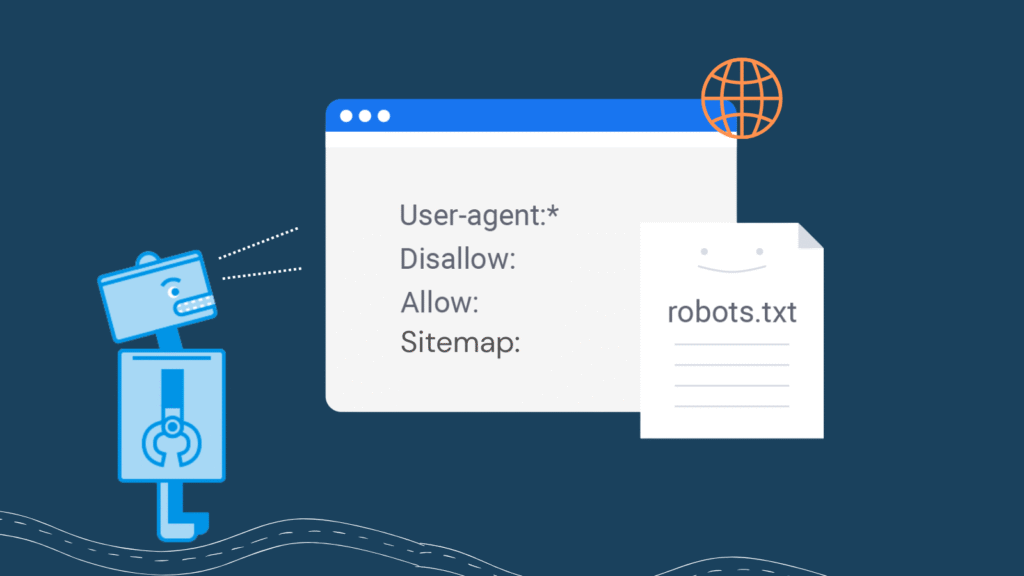
The robots.txt syntax is straightforward. Each instruction consists of directives that tell crawlers what to do. Here are the core elements:
- User-agent: Specifies which crawler the rules apply to. Use * for all bots, or name specific ones like Googlebot or Bingbot.
- Disallow: Tells crawlers which pages or directories to avoid. A path after Disallow: blocks that specific location.
- Allow: Overrides a Disallow rule for specific subdirectories. Useful when you block a directory but want one section accessible.
- Sitemap: Points crawlers to your XML sitemap, helping them discover your content structure more efficiently.
- Crawl-delay: Sets a delay (in seconds) between successive requests from a bot. Not supported by Google, but recognized by Bing and others.
The file must be named exactly robots.txt (lowercase) and placed in your root directory. It must be plain text, UTF-8 encoded, and each directive must be on its own line.
robots.txt Example: Real-World Use-Cases
Let’s look at practical examples that solve actual problems:
Sample robots.txt for a Basic Website
User-agent: *
Disallow: /admin/
Disallow: /private/
Disallow: /tmp/
Sitemap: https://yoursite.com/sitemap.xml
This blocks all crawlers from admin, private, and temporary directories while pointing them to your sitemap.
Example of robots.txt File for E-commerce Sites
User-agent: *
Disallow: /cart/
Disallow: /checkout/
Disallow: /account/
Disallow: /*?sort=
Disallow: /*?filter=
Allow: /
Sitemap: https://yourstore.com/sitemap.xml
This prevents indexing of cart pages, checkout flows, and filtered/sorted product pages that create duplicate content, while allowing access to everything else.
Blocking Specific Bots
User-agent: *
Disallow:

User-agent: BadBot
Disallow: /

User-agent: AnotherBadBot
Disallow: /
This allows all reputable bots but completely blocks specific aggressive or problematic crawlers.
Restricting Crawl Rate
User-agent: *
Crawl-delay: 10
Disallow: /search/
Sitemap: https://yoursite.com/sitemap.xml
This sets a 10-second delay between requests, useful for smaller servers or sites experiencing crawler-induced load issues.
How to Create or Edit robots.txt for Your Website
Creating a robots.txt file takes minutes. Here’s the exact process:
Step 1: Open any text editor (Notepad, TextEdit, VS Code, Sublime Text). Do not use word processors like Microsoft Word—they add hidden formatting.
Step 2: Write your directives following the syntax rules. Start with User-agent:, then add your Disallow: or Allow: rules, and include your Sitemap: location.
Step 3: Save the file as robots.txt (exactly this name, all lowercase, with .txt extension).
Step 4: Upload it to your website’s root directory. That’s the main folder where your homepage lives, not in a subdirectory. If your site is yoursite.com, the file must be accessible at yoursite.com/robots.txt.
Step 5: Test it immediately using Google Search Console’s robots.txt Tester tool or by simply visiting yoursite.com/robots.txt in a browser.
Most content management systems make this easier. WordPress users can edit robots.txt through plugins like Yoast SEO. Shopify generates one automatically but allows customization. Wix and Squarespace provide built-in editors.
How to Check robots.txt on Any Website
Want to see how other sites configure their robots.txt? It’s completely public information.
Simply type the domain followed by /robots.txt in your browser:
- google.com/robots.txt
- amazon.com/robots.txt
- yourcompetitor.com/robots.txt
You’ll instantly see their crawling rules. This is valuable competitive research, you can learn which sections they’re blocking, how they structure their directives, and identify potential SEO strategies.
To verify your own file works correctly, use Google Search Console’s robots.txt Tester. It shows exactly how Googlebot interprets your rules and flags any syntax errors.
robots.txt Best Practices You Must Follow
After working with hundreds of website configurations, these practices prevent common mistakes:
- Never use robots.txt as your only security measure. The file is publicly visible—anyone can read it. Blocked pages can still be accessed directly and should have proper authentication. Robots.txt is for guiding crawlers, not protecting sensitive data.
- Don’t block CSS and JavaScript files. Google needs these to render your pages properly. Blocking them can hurt your mobile-friendly rankings and prevent proper indexing.
- Use specific paths, not broad wildcards carelessly. Disallow: /admin/ blocks only the admin directory. Disallow: /ad would also block /advantages/ and /advertising/. Be precise.
- Always include your sitemap location. This single line dramatically improves crawl efficiency: Sitemap: https://yoursite.com/sitemap.xml
- Test before deploying. One typo can block your entire site from search engines. Use Google Search Console’s testing tool before uploading changes.
- Keep it simple. Overcomplicating robots.txt with dozens of rules creates maintenance headaches and increases error risk. Block what you must; allow everything else.
- Monitor search console regularly. Google alerts you to robots.txt errors that could be preventing important pages from being indexed.
Common robots.txt Mistakes That Kill SEO
The biggest mistake? Accidentally blocking your entire website. This happens more often than you’d think:
User-agent: *
Disallow: /
That single character—the forward slash after Disallow—tells all crawlers to ignore everything. Your site disappears from search results overnight.
Other critical errors include blocking images (preventing them from appearing in Google Images), blocking important product pages, creating syntax errors like missing colons, or placing the file in the wrong directory.
One Fortune 500 company once blocked Googlebot for six hours due to a robots.txt deployment error. Their organic traffic plummeted until the mistake was caught. Always test changes in staging first.
The One Question Every Website Owner Must Answer
Before you write a single line in your robots.txt file, ask yourself:
“What should search engines absolutely never index?”
Don’t think about what to allow—think about what to protect. Admin panels? Thank-you pages? Search result pages that create infinite crawl loops? Internal search queries with sensitive parameters?
When you answer this question clearly, robots.txt configuration becomes straightforward. You’re not guessing; you’re deliberately guiding crawlers to your best content while protecting areas that could harm your SEO or user privacy.
robots.txt vs. Noindex: Know the Difference
Many people confuse robots.txt blocking with noindex tags, but they serve different purposes:
- robots.txt prevents crawlers from accessing a URL entirely. The page isn’t crawled, but if other sites link to it, Google might still list it in results with limited information.
- noindex meta tag allows crawlers to access the page but tells them not to include it in search results. This is better for pages you want crawlers to see but not index.
The rule of thumb: Use robots.txt for server resources, duplicate content, and crawl budget management. Use noindex for pages you want crawled but not indexed—like confirmation pages or user-specific content.
Combining both can backfire. If you block a page in robots.txt, crawlers can’t see the noindex tag, potentially causing indexing issues. Choose one method based on your specific goal.
Final Thoughts
The robots.txt file is not complex web development or advanced SEO wizardry. It’s a fundamental tool that every website owner should understand and implement correctly.
At its core, robots.txt is about control—controlling how search engines discover your content, which pages deserve their attention, and how efficiently they can crawl your site. Get it right, and you’ve laid solid groundwork for SEO success. Get it wrong, and you might accidentally hide your entire website from the world.
Whether you’re running a personal blog, an e-commerce store, or a corporate website, remember this: robots.txt is your first conversation with search engines. Make it clear, make it accurate, and make it count.Ready to create your robots.txt file? Start simple. Block what needs blocking, point to your sitemap, and test thoroughly. Your search engine visibility depends on it.